A meeting recorder for Windows, Mac and Linux
Your team of specialists, in every meeting.
MidMeeting types your meeting out live on your own computer, and AI advisors you build leave you notes only you can see.
- Any call. Zoom, Meet, Teams, a phone on speaker. No bot joins.
- Notes, not interruptions. A claim that does not add up, a question nobody asked, a task nobody owned. On your screen only, never in the call.
- Yours, and private. The recording stays on your computer. When the call ends you get the summary and the to-do list.
$39 once · yours forever · up to 3 computers · 3 free meetings to try it
Forty seconds with your own team.
A team of specialists you build, leaving notes only you can see.
Download MidMeeting
Version 1.13.0. Three free meetings of any length, no card required.
Windows 10/11, 64-bit
macOS 14.4 or later, Apple Silicon
AppImage, Ubuntu 22.04+ and any modern distro
Also: .deb package · all releases
The macOS build is signed and notarized. The Windows installer is not signed yet, so SmartScreen will warn on first launch: click More info, then Run anyway.
What it runs on
Any 64-bit computer from the last few years records the meeting and writes the transcript. More memory and a graphics chip make the live parts feel instant.
| You want | Works on | Feels best on |
|---|---|---|
| Recording and the final transcript | Any 64-bit computer with 8 GB of memory | A graphics chip, NVIDIA, AMD or Apple silicon: the transcript is ready in seconds instead of minutes |
| Live text while people talk, and AI advisors on a cloud model | 8 GB of memory with the Small model installed from Settings, one click | 16 GB and Apple silicon or a recent graphics chip, so the default large-v3-turbo model keeps up live |
| The agent bridge, or an AI model running on your own computer | 16 GB of memory | 32 GB, or a graphics chip, when the meeting app and the agent share the machine |
Measured with large-v3-turbo on an hour of audio: about 3.5 minutes on an Apple M4, under a minute on an NVIDIA RTX 5060 Ti, about 15 minutes on a 24-thread CPU with no graphics chip.
The model matters as much as the machine
The machine decides how quickly the words appear. The model decides how quickly the note follows. We measured one advisor reading four minutes of transcript: Claude Haiku answers in about 2 seconds, Claude Sonnet in 2 to 3 seconds, Claude Opus in 4 to 8 seconds, and Opus at its highest reasoning effort takes up to 14 seconds through Claude Code. MidMeeting asks cloud models for light reasoning on every note, so the built-in copilot stays at the fast end. If you use the agent bridge, run the meeting on a fast model or a low effort level and save the deep thinking for afterwards.
Three steps, and you never leave the meeting.
Press record.
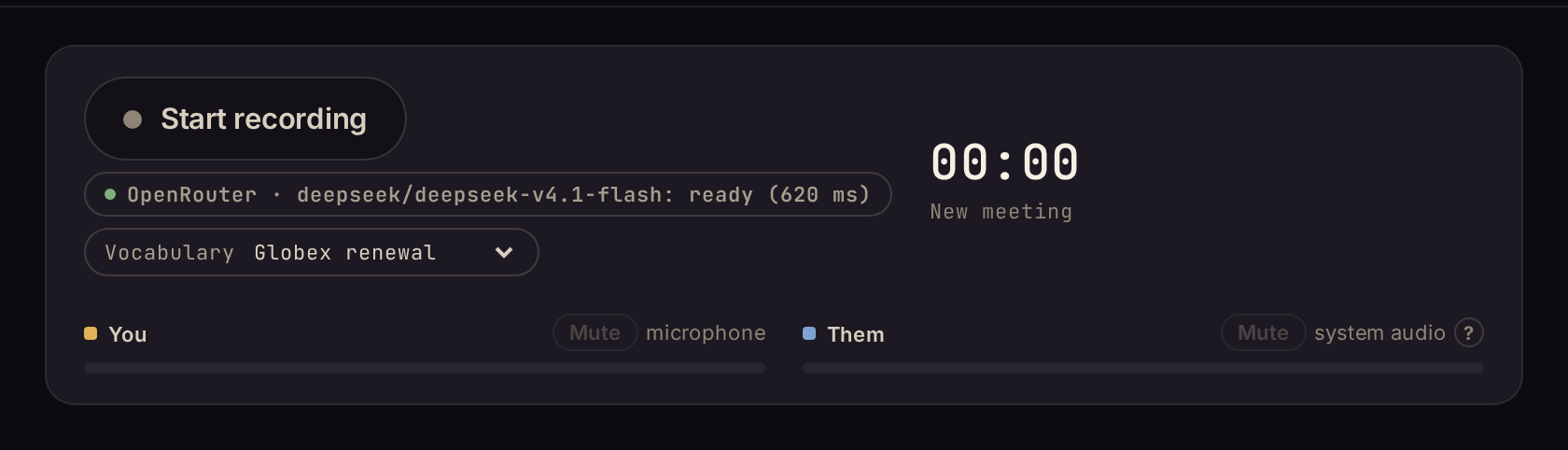
MidMeeting records what your microphone hears and what comes out of your speakers. It works with any meeting app, because it never touches the meeting app. No bot joins the call, nothing to install in Zoom, Meet, Teams or Discord. If the meeting has names worth spelling right, pick a vocabulary preset first.
Read as it happens.
Speech is turned into text on your own computer, a few seconds behind the speaker. Your lines are told apart from everyone else's automatically: your voice comes in through the microphone, theirs through the speakers.
Read the notes in the margin.
The AI advisors you picked read the text as it appears and write a short note only when a sharp colleague would have raised a hand. Nothing is said out loud, nobody in the call sees it. Highlight any line to ask a question about it.
AI advisors that leave a note only when it matters.
Before the call, choose who sits in with you: an engineer, a devil's advocate, a researcher, a note taker, or one you describe in your own words. We call them agents. Each one reads the live text and, every time someone finishes a sentence, decides whether it has something worth writing down. Usually it stays quiet. When it does write, you get a short card, forty words or fewer, with the reason.
Nobody has said who owns the migration if the vendor misses the date. Ask now, not in the retro.
"Fastest in the category" is their phrase, not a benchmark. Ask which test and which competitors, or drop it from the deck.
Logged: vendor contract review, owner Priya, due Friday. Nobody has owned the rollback plan yet.
On a fast model a card arrives a few seconds after the sentence ends. Every card is based only on what was actually said.
Rather not write the prompts yourself? Your AI agent can build and tune advisors for you.
Install the MidMeeting advisors skill: download https://midmeeting.com/skills/midmeeting-advisors/SKILL.md into your skills folder as midmeeting-advisors/SKILL.md (Claude Code: ~/.claude/skills, Codex: ~/.codex/skills, Cursor: ~/.cursor/skills, Grok: ~/.grok/skills). Then follow it to create a MidMeeting advisor that [describe what it should watch for, and who the meeting is with].
Highlight a line. Ask about it.
Select any part of the text and type a question: is this true, what did they say about this earlier, give me a counter-argument. The answer appears in a thread attached to the line you picked. After the call, the summary tab writes the summary, the action items, or a full report you can save.
Tell it the names before the call.
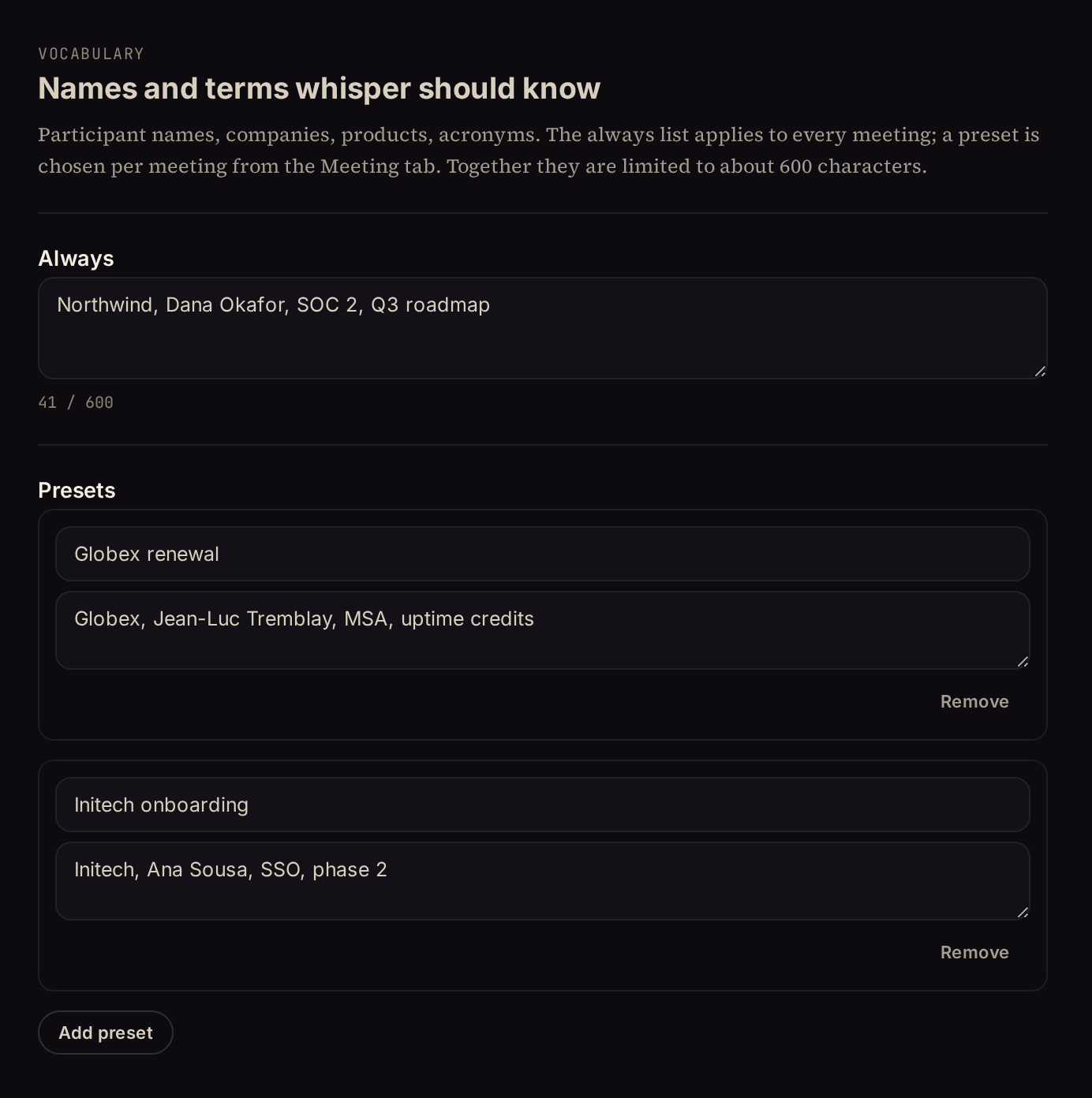
Rare names come out wrong in any transcript: a client's surname, a product, an acronym. Give MidMeeting the words once and it spells them right, live and in the final pass.
In Settings, keep an always-on list: your company, your team, the terms your work uses. Save a preset for each client or project on top of it, then pick one on the meeting screen before you press record. The list is handed to the speech model as a hint, on your own computer; nothing about it leaves the machine.
Bring your own brain.
For power users
Recording and the live text work on their own and need no account. The AI advisors, the questions and the summary need an AI model to think with, and MidMeeting does not sell you one. Instead you connect the one you already use, and pay that company directly, usually a few cents per meeting.
Three ways to connect: paste an API key from OpenRouter, Anthropic, OpenAI, Gemini or xAI (a key is a long password you get from their website); point MidMeeting at a model running on your own computer with LM Studio or Ollama, which costs nothing and sends nothing anywhere; or, if you already run a coding agent such as Claude Code or Codex, or the Code tab in Claude Desktop or ChatGPT, let it sit in the meeting itself through the agent bridge. How to set up the agent bridge. Keys are kept in your operating system's keyring, never in a settings file.
Already have an agent? Let it sit in.
This one is for people who already use an AI coding agent from the terminal. Flip on the agent bridge and MidMeeting streams the meeting to your machine as it happens. Point Claude Code, Codex, Cursor, Grok Build, the Code tab of Claude Desktop or ChatGPT, or any agent that can run a shell at it, and that agent hears the room live, answers what you highlight, and plays the advisors you armed, with everything it already knows: your repos, your notes, your tools. Nothing extra to install. Everything stays on your machine.
$ midmeeting-bridge tail
{"type":"segment","track":"them","text":"So Friday is fine.","from_ms":861000}
{"type":"ask","id":"ask-7","question":"Did they commit to a date earlier?"}
$ midmeeting-bridge answer ask-7 "Yes. At 14:02 they said Friday, then walked the scope back to two tiers at 14:15."
Built for the agent you already pay for. Not required: everyone else uses an API key or a local model, see Bring your own brain above.
The recording belongs to you, in the ordinary sense.
- Local by defaultAudio, text and summaries stay in a folder on your disk. Turning speech into text happens on your own computer, never on a server.
- Nothing leaves unless you say soOnly the AI company you choose ever sees the text, and only while the AI advisors are on. Run the AI on your own computer and nothing leaves at all.
- A visible window, not a hidden overlayMidMeeting is an app on your screen. It is a thinking partner you can share, not a cheat sheet you hide.
The things it does not do.
It does not put names on people. It knows which lines are yours, because they came in through your microphone, and which lines are everyone else's. It does not try to guess who among them said what.
No bot joins your meeting. Nothing appears in the participant list. The audio is never sent to a transcription service.
It is not a team product. One licence covers up to three of your own machines. There is no shared workspace and nothing syncs.
$39 once. Yours forever.
$39 USD, one time
- Up to 3 computers
- 3 free meetings of any length to try it
- Every update, no subscription
- Bring your own AI: you pay the AI company directly, not us
Ships for Windows, macOS 14.4 and later, and Linux.
Frequently asked questions
What is an AI advisor, or agent?
A set of instructions given to an AI model, such as "you are a sceptical engineer, flag claims that do not add up". MidMeeting ships with four and lets you write your own. They read the meeting text and write a short note, on your screen only, when they have something worth adding. They never talk in the call.
Do I need an AI account to use it?
Not for recording and the live text. For the advisors, the questions and the summary you connect an AI model: a pay-as-you-go key from an AI company, or a free model running on your own computer. See Bring your own brain, or the getting started guide for step-by-step help getting a key. You can also switch the copilot off entirely and just transcribe.
Can I use it without any AI at all?
Yes. Set the copilot to Off in Settings and MidMeeting becomes a meeting transcriber: it records both tracks, writes the transcript live on your own computer, and lets you export it. No key, no account, nothing sent anywhere. Turn the advisors back on whenever you want them.
Does it work with Zoom, Meet, Teams?
Yes, and with anything else that plays sound on your computer, including a phone on speaker. It records what your machine hears and what your microphone picks up, so it never depends on the meeting app.
Do I need a GPU?
No. It runs on any modern computer, just slower. A recent NVIDIA, AMD or Apple silicon graphics chip makes the live text feel instant. On an 8 GB machine, install the Small model as well from Settings: MidMeeting uses it for the live text while the final transcript keeps large-v3-turbo. See what it runs on.
Does it get names right?
Rare names trip every speech model. Put them in the vocabulary list in Settings, or in a preset for that client, and pick it on the meeting screen before you record. MidMeeting hands the list to the model as a hint.
What do the AI advisors cost to run?
Whatever the AI company charges you directly. A typical hour-long call with two advisors costs cents on a mid-size model, and nothing on a model running on your own computer.
Is my API key safe?
It is stored in your operating system's keyring, the same place your browser keeps passwords. It is never written to a settings file and never logged.
Can the other people tell?
Nothing joins the call, so no. Whether you tell them is between you and them, and MidMeeting is designed to be a window you can turn around and show.